I thought I’d discussed this before, but it seems I haven’t!
Because my local iTunes folder is large (something on the order of 8TB), and I want it backed up offsite as well as onsite, I use an iSCSI volume as the “local” storage, and then copy that to an SMB folder on the NAS so Roon can get at the share.1
The iSCSI volume lets Backblaze get at the data (which it won’t do for network volumes), so in additional to my local backups, it also gets up into the cloud just in case.
The Old World
Anyway, in the Olden Days, SuperDuper Classic couldn’t copy directly to a network destination, so I would make that iSCSI→SMB copy with rsync, which worked fine, but I ended up having to create a shell script to do it…because why type a complicated rsync command every time.
This all worked fine for many years (at least since 2012, when I wrote the shell script).
The New World
Every time I had to sync, I was nervous about making the copy. There’s so much data involved that, even using --dry-run and paying attention, if I wasn’t careful, things could go wrong—and then I’d be quite sad indeed. Unlikely with the shell script, of course, but the vagaries of NFC/NFD encoding, changes to SMB in macOS, or an update to the Samba implementation on the NAS could wreak havoc.
I wouldn’t lose anything, of course, but it could mean a very long recovery process.
But then…enter SuperDuper 4! (Cheers, confetti, thumbs-up emoji!)
Since SD4 can now copy directly to NAS devices, I was able to retire the old rsync script and do it from a copy job, folder to folder, from a “local” iSCSI volume to the NAS. And I could look at a Preview to see what was going to happen.
When I did, it showed

that some folders and artists with accents didn’t come over as expected with rsync.
Huh. Didn’t realize that!
You can also see there were also a lot of additional updates required. Once again, using SuperDuper 4’s Preview, I could see exactly what those were:
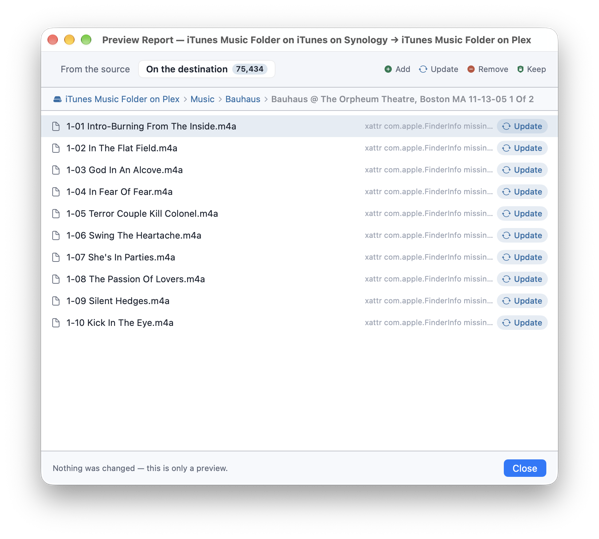
Some Finder extended attributes (xattrs) hadn’t been copied by rsync, so those needed to be updated to match the source.2
Server-side changes
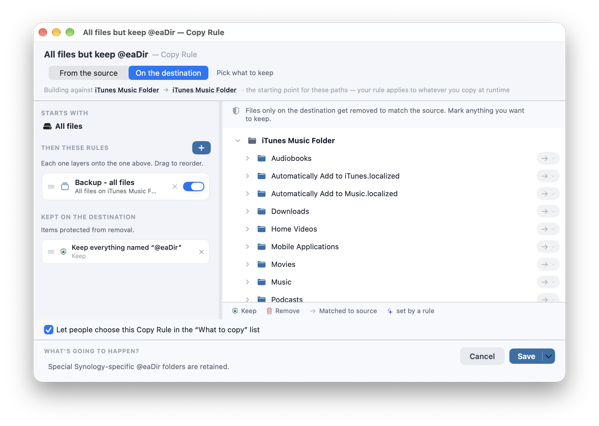
One other small thing: the Synology media indexer (which is also running on the NAS) adds folders named @eaDir all over the place. Without special handling, those would be deleted (since they’re not on the source), and that would force the indexer to regenerate them.
But with a simple rule that keeps **/@eaDir, that’s readily managed as well.3
That was easy!
I was surprised by how easy it was to do, and that SD4 caught some things that my old rsync process had done wrong.
I know I shouldn’t be surprised. I mean, I wrote the thing to do this stuff. But, it pleases me when a plan comes together.
-
Don’t get me wrong here: most of my music listening is done via LPs. But I do have a significant amount of music from CDs, etc., and all that is managed via iTunes and Roon.
In fact, I sync my Discogs database to iTunes/Qobuz/Tidal so that everything I purchase on LP is also available digitally…just in case I want to listen in the car, on the go, etc. (and that shows up in Roon as well). ↩︎
-
SuperDuper 4 is smart enough to update only the
xattrs in this case, without recopying the whole file…fortunately, because that would be very time-consuming. It’s many terabytes of data. ↩︎ -
Remember, in almost all cases, you want to include Backup - all files, and then add your additional rules “to” that, even though you’ve selected All files to start.
The reason? Backup - all files includes various Optional and Exclude rules that handle typical source drive configurations on macOS. It doesn’t matter much in this particular case…but it also doesn’t hurt. ↩︎