Well, summer’s almost over, and I haven’t done a Ketzl update for a while. So, here’s perhaps more than you wanted to know. (As with previous posts of this nature, I hope the details involved help others who might find themselves in a similar situation.)
K’s disease progresses. We slow the inevitable with exercise, physical therapy, drugs, harnesses, wheelchairs: whatever we can.
In fact, if you’re wondering why Shirt Pocket technical support is slower than usual on some afternoons, it’s usually because I’m down in Walpole, MA at
Sterling Impression. There, Ketzl gets massage, electro-stimulation, and hydrotherapy from the fine people there. It takes a few hours out of the middle of my day once a week, but I feel it’s time well spent.
Up until a few months ago, Ketzl was able to use their water treadmill. Alas, her rear legs are no longer under any kind of conscious control, and are almost entirely atrophied: bones covered with a teeny bit of muscle and tendon where there used to be large, strong, cart-pulling tree trunks. So, she now does laps in the therapy pool (22 last week — she was rarin’ to go), wearing a life preserver to improve her buoyancy.
After the swim, it takes me nearly an hour to dry her completely, which is important since she spends so much of her time lying down: you don’t want her to remain wet, as it tends to lead to hot spots.
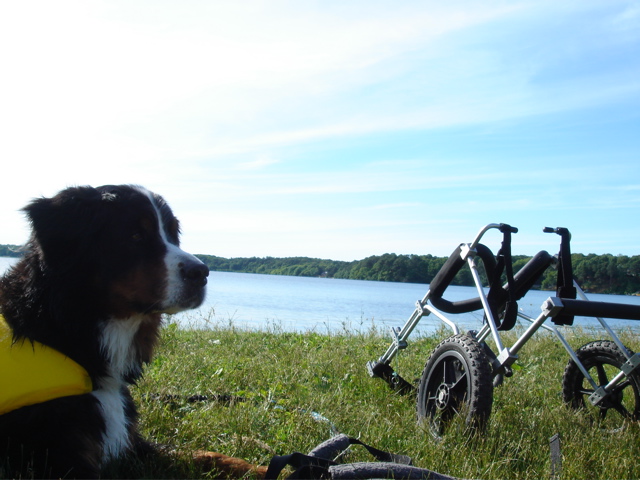
Although her front limbs continue to weaken, she’s still able to support herself, and we use her
wheelchair to walk every day at
80 Acres — some conservation land near my house. There’s a pond there, and it’s always a bit of a challenge to prevent her swimming — which (despite the momentary delight) would involve hours of drying. Her frustration is palpable, but I try to alleviate it with a cookie or two: an effective tactic!
Ketzl is, at this point, almost entirely incontinent, but it’s much easier to deal with than I had feared. Her patterns are regular and relatively easy to anticipate — and if we do things right, she goes outside when and where she’s supposed to.
When she’s in the house, we place her on an absorbant “diaper pad”, just in case there’s an accident. While they’re rare, they do happen — and this makes them very easy to clean up.
Part of the reason this hasn’t been a huge problem is due to a condition called “neuro bladder”. Basically, the muscles around the bladder atrophy along with everything else, and the bladder itself expands. The result is that she can hold an awful lot of urine before she needs to go — too much, in fact, so it’s important that we take her out often during the day.
The muscle wasting means we must assist her, which involves helping to position her rear legs, moving her tail out of the way, and putting light pressure on the bladder to help it empty. Doing this while also holding her back end up is a challenge, but Zabeth and I have managed to get pretty good at it over the past few months, and Ketzl has been very tolerant as we’ve figured out the best ways to help her.
Probably the most difficult part has been nighttime, as we’ve always let Ketzl sleep on our bed. Dogs with diseases like this tend to get a kind of separation anxiety at night, Ketzl included, and sleep erratically, occasionally whining or panting for an hour at a time. It’s not conducive to sleep, and I don’t think I’ve managed to get more than about two hours of continuous rest for many months. Recently, we’ve been giving her a light tranquilizer at bedtime, and it’s helped quite a bit — but if you see me around and it looks like I haven’t slept in weeks… well, basically, I haven’t. :)
So, there you go! Details aside, she’s doing really well. Dogs love “routine”, and there are a
lot of routines involved in her daily care. She’s alert and in excellent spirits, with no noted depression or mood changes… in other words, she’s still Ketzl.
And while that’s a
great thing, it’s also part of what makes this so incredibly difficult.
 You might also notice the pop-up in On successful completion. In there, we’ve got many more options for what happens after the copy completes, including the ability to shut down the computer, put it to sleep, simply set the destination as the startup volume, etc.
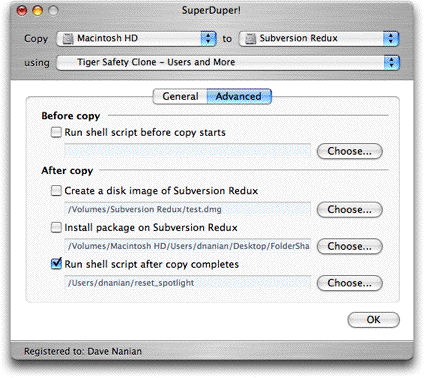
And then, in the Advanced tab, much geekier things that most users don’t need.
We’ve added an additional Before copy option to run a script — this allows people to do cool things like dump MySQL databases before backing up and do other “before you touch things” operations, and renamed things a bit to make their purpose clearer.
So, we ended up with:
You might also notice the pop-up in On successful completion. In there, we’ve got many more options for what happens after the copy completes, including the ability to shut down the computer, put it to sleep, simply set the destination as the startup volume, etc.
And then, in the Advanced tab, much geekier things that most users don’t need.
We’ve added an additional Before copy option to run a script — this allows people to do cool things like dump MySQL databases before backing up and do other “before you touch things” operations, and renamed things a bit to make their purpose clearer.
So, we ended up with:
 So — there you go… and yes, everything we’ve posted about so far works, and works well.
Back to the grind!
So — there you go… and yes, everything we’ve posted about so far works, and works well.
Back to the grind!